
LibreOffice 3.5: Free Office Suite Download
- 02/15/2012 01:16pm
LibreOffice 3.5 is the third major version of LibreOffice and brings users enhancements stemming from the development strategy adopted since September 2010. This free office suite is the result of the combined efforts of full-time developers and volunteer coders.
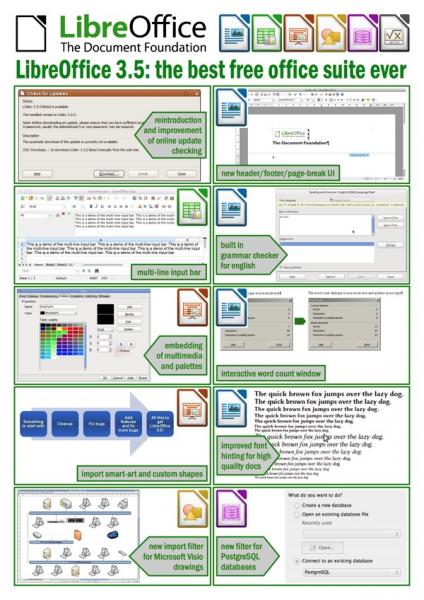
For 16 months, an average of 80 developers each month provided a total of over 30,000 fixes while introducing new features across the main applications of the suite. These improvements affect document editing, spreadsheets, presentations, drawings, databases and ODF documents.
Writer Enhancements
Writer, the word processor included in LibreOffice 3.5, receives improvements designed to help users create and refine professional documents.
- A new grammar checker
- Improved typographic features for even more professional documents
The new grammar checker helps with text review, while the improved typographic features support cleaner and more polished document formatting.
Impress / Draw Enhancements
Impress / Draw
Impress and Draw include improvements for presentations, diagrams and drawing documents, especially when working with files created in other office software.
- Improvement of the custom shapes and Smart Art importer from PPT / PPTX
- A feature for incorporating multimedia/color palettes into ODF documents
- A Microsoft Visio import filter
The custom shapes and Smart Art importer from PPT / PPTX helps users open and work with presentation content created in Microsoft Office formats. The feature for incorporating multimedia/color palettes into ODF documents supports richer OpenDocument files. The Microsoft Visio import filter adds another way to access diagram content inside the LibreOffice environment.
Calc Enhancements
Calc
Calc, the spreadsheet application in LibreOffice 3.5, receives several changes for larger spreadsheets, formula work, filtering and formatting.
- Supports up to 10,000 sheets
- A new multi-line input box
- New Calc functions compliant with ODF OpenFormula specifications
- Improved performance when importing files from other office suites
- Multiple selections in autofilter
- Unlimited rules for conditional formatting
Support for up to 10,000 sheets is useful for large spreadsheet files. The new multi-line input box makes it easier to enter or edit longer content inside cells. New Calc functions compliant with ODF OpenFormula specifications strengthen spreadsheet compatibility with the OpenDocument format. Improved performance when importing files from other office suites helps users work with external files more efficiently.
Multiple selections in autofilter make data filtering more flexible, and unlimited rules for conditional formatting allow users to apply several formatting conditions to spreadsheet data.
Base Enhancement
Base
Base, the database component of LibreOffice 3.5, includes a new database connectivity option.
- A new built-in native PostgreSQL driver
The built-in native PostgreSQL driver allows Base users to work with PostgreSQL databases directly through the functionality provided in this version.
Online Update Checker
Additionally, for the first time in LibreOffice history, the online update checker will be activated, allowing users to be notified when a new version of the suite is available.
This update checker is intended to inform users when a new version of LibreOffice is available, so they can stay aware of updates from within the suite.
LibreOffice 3.5 Feature Summary
| Component | Features mentioned in LibreOffice 3.5 |
|---|---|
| Writer | New grammar checker and improved typographic features |
| Impress / Draw | Improved custom shapes and Smart Art importer from PPT / PPTX, multimedia/color palettes in ODF documents, Microsoft Visio import filter |
| Calc | Up to 10,000 sheets, multi-line input box, ODF OpenFormula functions, improved import performance, autofilter selections and unlimited conditional formatting rules |
| Base | Built-in native PostgreSQL driver |
| Suite update | Online update checker activated for notifications when a new version is available |
LibreOffice Download
LibreOffice 3.4.4 is available for immediate free download from the following link: https://en.libre-office.fr/staticpages/index.php/download-libreoffice-for-free
Use the official download link above to access the LibreOffice download page mentioned in this article.
FAQ about LibreOffice 3.5
What is LibreOffice 3.5?
LibreOffice 3.5 is the third major version of LibreOffice. It is a free office suite that includes applications such as Writer, Calc, Impress, Draw and Base.
What are the main Writer enhancements in LibreOffice 3.5?
Writer includes a new grammar checker and improved typographic features, helping users prepare more professional documents.
What improvements does Calc receive in LibreOffice 3.5?
Calc supports up to 10,000 sheets, adds a new multi-line input box, includes new functions compliant with ODF OpenFormula specifications, improves import performance, supports multiple selections in autofilter and allows unlimited rules for conditional formatting.
Does LibreOffice 3.5 improve Impress and Draw?
Yes. Impress and Draw receive improvements to the custom shapes and Smart Art importer from PPT / PPTX, a feature for incorporating multimedia/color palettes into ODF documents and a Microsoft Visio import filter.
Does LibreOffice 3.5 include an update checker?
Yes. For the first time in LibreOffice history, the online update checker will be activated, allowing users to be notified when a new version of the suite is available.
Conclusion
LibreOffice 3.5 brings together enhancements for Writer, Impress, Draw, Calc and Base, along with an online update checker. The version described here includes improvements for document editing, spreadsheet work, ODF documents, presentation imports and database connectivity.

