
LibreOffice 5.4.4 Now Available for Download
- 12/21/2017 03:18am
LibreOffice 5.4.4 is now available for download. The Document Foundation (TDF) has announced LibreOffice 5.4.4, the fourth minor release of the LibreOffice 5.4 family, one month ahead of the major announcement of LibreOffice 6.0. While it still offers advantages in terms of features, conservative users and businesses can begin the upgrade process from their current implementation of LibreOffice 5.3.
LibreOffice is a powerful office suite. Its clean interface and powerful tools allow you to unleash your creativity and enhance your productivity. LibreOffice integrates several applications that make it the most powerful Free & Open Source office suite on the market: Writer, the word processor, Calc, the spreadsheet, Impress, the presentation engine, Draw, the drawing and graphics application, Base, our database, and Math for editing mathematical equations.
With LibreOffice 5.4.4, users can work on common office tasks from a single suite. The software is designed for writing documents, preparing calculations, creating presentations, drawing diagrams, managing databases, and editing equations. This makes it suitable for daily productivity needs at home, in education, and in professional environments, while keeping the document formats mentioned below available to users.
Your documents will have a professional and polished appearance, regardless of their purpose: a letter, a master's thesis, a brochure, financial reports, marketing presentations, technical drawings, and diagrams.
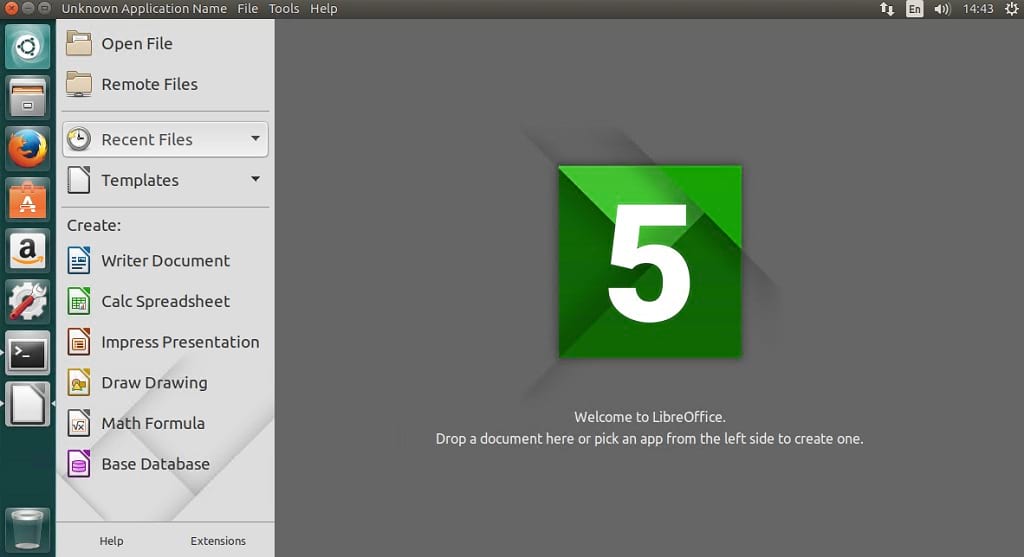 The offline installer for LibreOffice PC is compatible with various document formats such as Microsoft® Word, Excel, PowerPoint, and Publisher. But LibreOffice goes further by allowing you to use a modern open standard, the ODF (Open Document Format). Beyond the many features provided by default, LibreOffice is easily extensible thanks to its powerful extension mechanisms.
LibreOffice 5.4.4 at a glance
| Item | Details mentioned |
|---|---|
| Version | LibreOffice 5.4.4 |
| Release family | Fourth minor release of the LibreOffice 5.4 family |
| Publisher | The Document Foundation (TDF) |
| Main applications | Writer, Calc, Impress, Draw, Base, Math |
| Document formats | Microsoft® Word, Excel, PowerPoint, Publisher, and ODF |
| Use cases | Letters, theses, brochures, reports, presentations, technical drawings, diagrams, databases, equations |
What Does LibreOffice Offer You?
Writer is LibreOffice's word processor. Use it for everything from writing a short letter to producing an entire book with tables of contents, embedded illustrations, bibliographies, and diagrams. Automatic entry and formatting and real-time spell check make difficult tasks easier (but can easily be disabled if you prefer).
In practical use, Writer helps prepare simple text documents as well as longer structured files. Tables of contents, embedded illustrations, bibliographies, and diagrams are useful when a document needs clear organization and a polished layout.
Calc tames your numbers and helps you make tough decisions when weighing alternatives. Analyze your data with Calc and then use it to present your final results. Charts and analysis tools contribute to the transparency of your conclusions. An entirely integrated help system makes entering complex formulas easy. Add data from external databases such as SQL or Oracle, then sort and filter to produce statistical analyses.
Calc is intended for spreadsheets, calculations, data analysis, and reports. Its charts, formulas, sorting, filtering, and database connections help transform raw data into readable results.
Impress is the fastest and easiest way to create effective multimedia presentations. Stunning animations and sensational special effects help you convince your audience. Create presentations that look even more professional than the standard presentations you commonly see at work. Capture the attention of your colleagues and supervisors by creating something a little different.
Impress can be used to build slides for meetings, lessons, product presentations, or marketing presentations. Animations and special effects can help organize information visually and support oral explanations.
Draw allows you to build diagrams and sketches from scratch. A picture is worth a thousand words, so why not try something simple with box-and-whisker diagrams? Or go further and easily create dynamic 3D illustrations and special effects. It can be as simple or as powerful as you wish.
Draw is useful when information is easier to understand as a visual element. It can help create sketches, diagrams, technical drawings, and graphics that complement written documents or presentations.
Base is the database component of the LibreOffice suite. With Base, you can seamlessly integrate your existing database structures into other LibreOffice components or create an interface to use and manage your data as a standalone application. You can use imported and linked tables and queries from MySQL, PostgreSQL, or Microsoft Access, among many other data sources, or design your own database.
Base is designed for users who need to organize, connect, and manage structured data. It can work with imported and linked tables and queries, making it possible to use database information inside the LibreOffice environment.
Math is a simple equation editor that allows you to quickly type and display your mathematical, chemical, electrical, or scientific equations in standard written notation. Even the most complex calculations can be understandable when properly displayed. E = mc².
Math is dedicated to equations and formulas. It helps display scientific, mathematical, chemical, or electrical notation clearly, especially when equations need to appear in documents prepared with the suite.
Document formats and extensibility
LibreOffice 5.4.4 supports work with several document formats listed in this article, including Microsoft® Word, Excel, PowerPoint, Publisher, and the ODF (Open Document Format). This compatibility helps users open, create, and share office documents in common formats while also using an open standard format.
The suite also includes extension mechanisms. These mechanisms allow LibreOffice to be extended beyond the features provided by default, while keeping the core applications focused on writing, spreadsheets, presentations, drawings, databases, and equations.
Deployment and support information
The Document Foundation offers users and businesses conservative deployment of LibreOffice with support from certified developers, migrators, and trainers. An updated list is available at here.
For users and businesses mentioned in the announcement, this support information is useful when planning a conservative deployment or an upgrade process from a current implementation of LibreOffice 5.3.
FAQ about LibreOffice 5.4.4
What is LibreOffice 5.4.4?
LibreOffice 5.4.4 is the fourth minor release of the LibreOffice 5.4 family announced by The Document Foundation.
Which applications are included in LibreOffice?
LibreOffice includes Writer, Calc, Impress, Draw, Base, and Math. These applications cover word processing, spreadsheets, presentations, drawings, databases, and equation editing.
Which document formats are mentioned for LibreOffice PC?
The article mentions compatibility with document formats such as Microsoft® Word, Excel, PowerPoint, Publisher, and the ODF (Open Document Format).
Can LibreOffice be extended?
Yes. The article states that LibreOffice is easily extensible thanks to its powerful extension mechanisms.
Who provides support for conservative deployment?
The Document Foundation offers support for users and businesses through certified developers, migrators, and trainers.
Conclusion
LibreOffice 5.4.4 provides a complete Free & Open Source office suite with Writer, Calc, Impress, Draw, Base, and Math. The release keeps the LibreOffice 5.4 family available for users who need document creation, spreadsheet analysis, presentations, graphics, database tools, equation editing, format compatibility, and extensibility in one office suite.

