
LibreOffice Online is a cloud version of the LibreOffice suite designed for free online document editing in a web browser. It uses the same underlying engine as the desktop application.
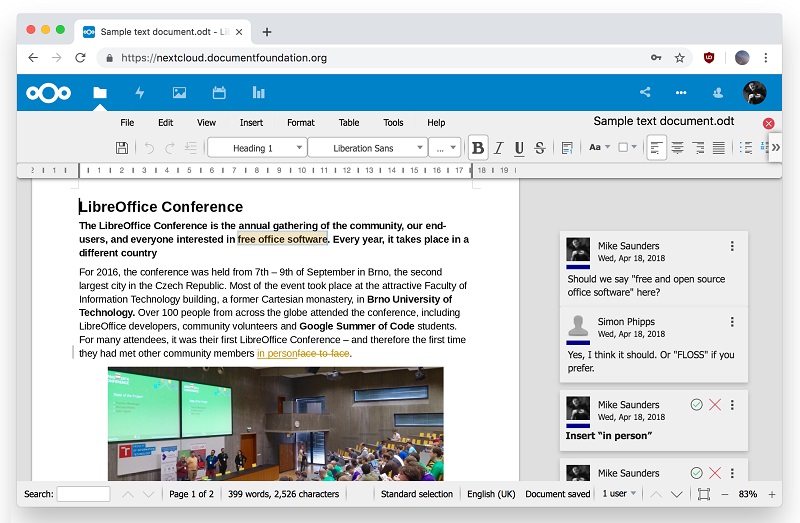
Built from the core code of the LibreOffice project, it allows for the visual display and collaborative editing of documents. This means users can open documents through a browser while keeping the document rendering close to the desktop version of LibreOffice.
Birth of the LibreOffice Online Project
The development of LibreOffice Online is an HTML5 web-based technology produced by SUSE.
In 2015, this proof of concept was rewritten into an initial development release by Collabora, allowing users to test LibreOffice Online for the first time.
In 2016, the first source code version of LibreOffice Online, a cloud-based office suite that offers basic collaborative document editing in a browser by reusing the "core engine" of LibreOffice, was added to the main branch for the announcement of LibreOffice 5.3.
This latest development brought collaborative editing to LibreOffice Online, a feature that transforms the application into an ultra-modern cloud office suite - the first to natively support the ISO/IEC standard ODF (Open Document Format) with collaborative editing capabilities.
The rendering fidelity of LibreOffice Online is equivalent to that of desktop software, and the interoperability matches that of LibreOffice with support for standard and proprietary document formats.
LibreOffice Online has been primarily developed by Collabora, one of the leading contributors to the LibreOffice codebase and community.
In practical terms, LibreOffice Online focuses on making office documents accessible from a browser while keeping key LibreOffice strengths: document formatting, ODF support, compatibility with several document formats, and collaborative editing.
LibreOffice Online in 2018
The main feature of online office suites is collaborative editing, and LibreOffice Online is no exception. The server module, which is key to this functionality, is improved with each new version of LibreOffice, focusing on performance and security.
The graphical user interface was enhanced with the release of LibreOffice 6.1, exposing various dialogs from the LibreOffice core to the web browser. These dialogs included:
- Writer: find and replace, modify style, hyperlink, special character, index entry, character, paragraph, bullets and numbering, table properties, spelling and grammar, word count, track changes management, insert header, and
- Calc: ability to add an auto filter, ability to filter auto filter pop-up windows, cell formatting, sorting function, support for hidden sheets, editing data series, and data validation
- Impress: Position and size, line and area
These features covered common editing needs directly in the browser. Writer functions helped with text editing, document review, layout, and formatting. Calc functions supported spreadsheet filtering, sorting, cell formatting, and data validation. Impress functions focused on presentation object placement and visual formatting.
The most significant improvements and new features announced at the time of LibreOffice 6.2 included:
- Performance: improvements to scrolling, zooming, disk space, session and cache management, reduced latency and unnecessary animation, and removal of the new comment and red line presentation
- Mobile: simplification of the user interface, improved on-screen keyboard and cursor handling, addition of a contextual toolbar, and cleanup of other toolbars
- Integration: insertion of remote charts from integration, addition of a configurable delay for document conversion, installation of sample Web server configuration snippets,
- Document signing: integration of Vereign-compatible authentication and document signing, new signing and certificate APIs in LibreOfficeKit, configuration to enable/disable signing, and addition of the signature info bar
- Other features: opening PDF files in a new tab, improved configuration options for change tracking, addition of a new shape insertion toolbar and missing default values, and generation of cleaner, more appealing 404 error reports
These improvements were related to several everyday uses of a web-based office suite: editing large documents more comfortably, working from mobile devices, integrating files or charts from remote services, signing documents, and handling PDF files from the browser environment.
LibreOffice Online Features Mentioned
The article mentions several LibreOffice Online capabilities that are useful for document editing and collaboration:
- Collaborative editing in a browser.
- Visual display of documents using the LibreOffice core engine.
- Native support for the ISO/IEC standard ODF, the Open Document Format.
- Support for standard and proprietary document formats through LibreOffice interoperability.
- Writer dialogs for text editing, formatting, spelling and grammar, word count, track changes, and tables.
- Calc dialogs for filters, sorting, cell formatting, hidden sheets, data series, and data validation.
- Impress dialogs for position, size, line, and area settings.
- Performance, mobile, integration, signing, PDF opening, and configuration improvements announced at the time of LibreOffice 6.2.
The Positioning of LibreOffice Online
The LibreOffice Online Server software is fully functional and user-friendly. As such, it can be considered a enabling technology for public cloud ISPs, or the private cloud of enterprises and large organizations when integrated - for example - with enterprise file synchronization and sharing software or groupware solutions.
The Document Foundation does not support the development of a public cloud solution from Google and Microsoft, as it does not have the original mission of the project. The goal is to open up Internet service providers and open source cloud solution providers, with many options already available on the market.
Given the critical nature of LibreOffice Online, the Document Foundation will not manage binary files for enterprises, as this would not be fulfilled by a volunteer-based support system. However, images are available for download on the Docker platform.
For organizations, this positioning means LibreOffice Online Server is intended to be integrated with other cloud, file synchronization, sharing, or groupware solutions. The article also notes that Docker images are available for download on the Docker platform.
FAQ About LibreOffice Online
What is LibreOffice Online?
LibreOffice Online is a cloud version of the LibreOffice suite. It runs in a web browser and uses the same underlying engine as the desktop application.
Does LibreOffice Online support collaborative editing?
Yes. The article explains that collaborative editing is a main feature of online office suites and that LibreOffice Online includes collaborative document editing in a browser.
Which document format is highlighted for LibreOffice Online?
The article highlights native support for the ISO/IEC standard ODF, also called Open Document Format, with collaborative editing capabilities.
Which LibreOffice modules are mentioned for browser dialogs?
The article mentions Writer, Calc, and Impress. It lists browser-accessible dialogs and features for text documents, spreadsheets, and presentations.
Who primarily developed LibreOffice Online?
LibreOffice Online has been primarily developed by Collabora, one of the leading contributors to the LibreOffice codebase and community.
Conclusion
LibreOffice Online brings the LibreOffice document engine to the browser for cloud-based document editing. The article highlights collaborative editing, ODF support, rendering fidelity, interoperability, and several Writer, Calc, and Impress features exposed through the web interface.

