
Innovative Application for Android Users
LibreOffice for Android and iOS in 2024 can be used through mobile solutions designed to view and edit office documents on smartphones and tablets. The Document Foundation now offers an innovative application for LibreOffice users on Android devices. This viewer app allows easy access to your LibreOffice documents while providing experimental support for editing. Downloadable from Google Play and F-Droid, this application integrates seamlessly into your Android ecosystem.
The LibreOffice Viewer app is useful when you need to open documents in common office formats while away from a desktop computer. It focuses on access to documents and includes experimental editing options that must be enabled in the application settings.
Comprehensive Editing Solutions
For those looking to edit documents more comprehensively, Collabora, one of the certified developers and members of the ecosystem, also offers Collabora Office for Android and iOS. This complete solution allows you to leverage the experience and power of LibreOffice directly on your mobile devices.
Collabora Office is aimed at mobile users who need a broader office suite experience. It includes tools for text documents, spreadsheets, and presentations, while keeping support for many LibreOffice and Microsoft Office file formats already used on desktop systems.
About the LibreOffice Viewer App on Google Play
LibreOffice is the best desktop office suite, now available as a native app for Android. LibreOffice Viewer supports many document formats, including:
- Open Document Format (odt, ods, and odp)
- Microsoft Office 2007–2016 (docx, xlsx, and pptx)
- Microsoft Office 97–2003 (doc, xls, and ppt)
These formats cover text documents, spreadsheets, and presentations. This means that the app can be used to open many files created with LibreOffice, OpenOffice.org, or Microsoft Office, depending on the format listed above.
Experimental Editing Features LibreOffice Viewer includes a preview of editing features, which are considered experimental and not yet stable enough for essential tasks. To enable this feature, go to the app's settings.
This distinction is important for mobile use. The viewer function is intended for opening and reading documents, while the editing function is still presented as experimental. For essential tasks, the article already notes that these editing features are not yet stable enough.
Community Participation Feedback and bug reports are welcome to help developers improve the quality of the app and make it a complete editor. You can report bugs and attach relevant files on bugzilla.
When reporting a problem, attaching a relevant file can help developers reproduce the issue. This is especially useful when the problem is linked to a specific document format, layout, or editing action.
Technology and License LibreOffice Viewer uses the same engine as LibreOffice for Windows, macOS, and Linux, combined with a new environment based on Firefox for Android, providing a similar experience to the desktop office suite. The app is available under the Mozilla Public License v2.
Development and Contributions LibreOffice Viewer has been developed by Collabora and Igalia, supported by Smoose, with contributions from students of the Google Summer of Code and cooperation from The Document Foundation and the LibreOffice community. SUSE provided an essential component for cross-platform support, and Mozilla Corporation contributed several core components. Special thanks to the hundreds of independent LibreOffice contributors since 2010.
LibreOffice is based on OpenOffice.org (commonly known as OpenOffice). For a complete list of acknowledgments, visit our credits page.
Last updated: May 8, 2024
Download LibreOffice Viewer from Google Play or F-Droid and discover the power of LibreOffice on your Android device!
Presentation of Collabora Office for Android and iOS
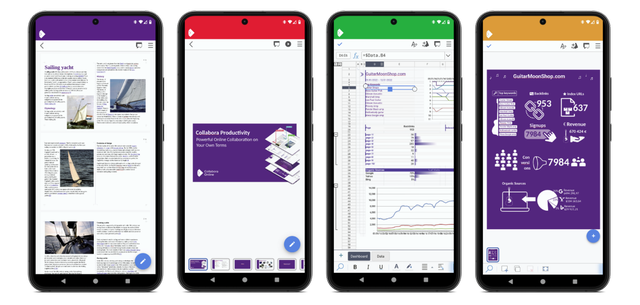
Collabora Office is a complete mobile office suite that includes a word processor, a spreadsheet, and a presentation tool. Based on LibreOffice, the world’s most widely used open-source office suite, Collabora Office now allows you to expand your work and collaboration capabilities on mobile, thanks to its availability on Android and iOS.
In practical use, the word processor is used for text documents, the spreadsheet tool is used for tables and calculations, and the presentation tool is used for slide decks. These uses match the document types and file formats listed in this article.
Collabora Office for Android and iOS is available for download on the Play Store and the App Store, as well as on F-Droid. The latest instant version for Android is also available for download in .apk format. The required Android version is 5.0 or later. The required iOS version is 12.2 or later and is compatible with iPhone, iPad, and iPod touch. To learn more about our mobile office suite, check out the product page or visit the credits section to discover the people involved.
Key Features
Supported File Formats Collabora Office supports a wide range of file formats, allowing you to work with different types of documents without issues:
- Open Document Format: .odt, .odp, .ods, .ots, .ott, .otp
- Microsoft Office 2007/2010/2013/2016/2019: .docx, .pptx, .xlsx, .dotx, .xltx, .ppsx
- Microsoft Office 97/2000/XP/2003: .doc, .ppt, .xls, .dot, .xlt, .pps
The supported formats include modern Office files, older Microsoft Office files, and Open Document Format files. This helps users open and work with documents received from different desktop office suites, as long as the file types are included in the supported list.
Continuous Development and Feedback
The application is under intensive development, and user feedback as well as bug reports are strongly encouraged. You can report any issues encountered and attach relevant files via our bug tracker: https://col.la/android. Please note that all submissions in the bug tracker are public.
Because submissions in the bug tracker are public, users should avoid attaching private or sensitive documents. If a file is needed to explain a problem, it should be relevant to the issue being reported.
Underlying Technology
Collabora Office for Android uses the same engine as LibreOffice for Windows, macOS, and GNU/Linux, while integrating a front-end based on Collabora Online. This enables a reading and document saving experience similar to that of the desktop version.
This shared engine is presented as a way to bring the LibreOffice desktop document experience to mobile devices. The front-end based on Collabora Online provides the mobile interface used to read and save documents.
Development Team
The application is developed by a dedicated team of engineers, including Tor Lillqvist, Tomaž Vajngerl, Michael Meeks, Miklos Vajna, Jan Holešovský, Mert Tümer, and Rashesh Padia, with support from some students of the Google Summer of Code project such as Andrzej Hunt, Iain Billet, and Kaishu Sahu.
License and Update
Collabora Office is open-source software, distributed under the Mozilla Public License v2 and other licenses. The last update of the application was made on October 25, 2023.
Explore the possibilities offered by Collabora Office for Android and iOS and transform your way of working on mobile!
LibreOffice for Android and iOS: quick comparison
| Mobile solution | Platform mentioned | Main use described | Download sources mentioned |
|---|---|---|---|
| LibreOffice Viewer | Android | View LibreOffice documents with experimental editing support | Google Play and F-Droid |
| Collabora Office | Android and iOS | Word processor, spreadsheet, and presentation tool | Play Store, App Store, F-Droid, and .apk format for Android |
FAQ about LibreOffice for Android and iOS
Is LibreOffice available on Android?
Yes. LibreOffice Viewer is available as a native app for Android. It can be downloaded from Google Play and F-Droid, and it supports several LibreOffice and Microsoft Office document formats.
Can LibreOffice Viewer edit documents on Android?
LibreOffice Viewer includes experimental editing features. They are described as a preview and are not yet stable enough for essential tasks. They can be enabled in the app's settings.
Is there a LibreOffice-based solution for iOS?
Yes. Collabora Office is based on LibreOffice and is available for Android and iOS. The article mentions availability through the Play Store, the App Store, and F-Droid.
Which file formats are supported by Collabora Office?
Collabora Office supports Open Document Format files such as .odt, .odp, and .ods, as well as several Microsoft Office formats, including .docx, .pptx, .xlsx, .doc, .ppt, and .xls.
What are the required mobile versions for Collabora Office?
The required Android version is 5.0 or later. The required iOS version is 12.2 or later, with compatibility mentioned for iPhone, iPad, and iPod touch.
Conclusion
LibreOffice for Android and iOS can be approached through two mobile options described in this guide. LibreOffice Viewer provides access to documents on Android with experimental editing features, while Collabora Office offers a broader mobile office suite for Android and iOS. Both solutions keep a focus on open-source software, document formats, and mobile access to office files.

