Welcome to Download LibreOffice, Anonymous 10/13/2026 07:26pm

Download Free LibreOffice 6.4.4 Now Available

  • 05/22/2020 07:14am

LibreOffice 6.4.4 is now available. The Document Foundation announces the fourth minor release of the LibreOffice 6.4 family, aimed at technology enthusiasts and experienced users. LibreOffice 6.4.4 includes numerous bug fixes and document compatibility improvements.

Download Free LibreOffice 6.4.4 Now Available

Latest Features in LibreOffice 6.4.4

LibreOffice 6.4.4 represents the cutting edge in features for open-source office suites and is not optimized for enterprise-class deployments, where stability is often more critical than features. Users looking for a more mature version can download LibreOffice 6.3.6, which includes several months of backported fixes.

This release is presented as part of the LibreOffice 6.4 family. It focuses on bug fixes and document compatibility improvements, while keeping the same open-source office suite approach used by LibreOffice.

How to Number Pages in LibreOffice Writer

  • 03/17/2020 10:50pm

This article explains how to number pages in LibreOffice Writer by inserting page numbers and associated information in the headers and footers of a document.

How to number pages in LibreOffice Writer?

Insert a Page Number Field

You need to place a page number field in a header or footer for that number to appear on each page and change from one page to the next.

The page number appears on a gray background indicating that it is a field; although visible on the screen, this background is not printed.

In LibreOffice Writer, a page number field is useful because it updates automatically. Once it is inserted in the header or footer, you do not need to type page numbers manually on every page.

Download LibreOffice 6.4 Free Office Suite

  • 01/30/2020 09:50pm

LibreOffice 6.4 is now available as a free office suite from The Document Foundation. This major new version offers improved performance, particularly when opening and saving spreadsheets and presentations, along with excellent compatibility with DOCX, XLSX, and PPTX files.

LibreOffice provides the highest level of compatibility in the field of office suites, starting from native support for the Open Document Format (ODF) - with security features and interoperability superior to proprietary formats - to nearly perfect support for DOCX, XLSX, and PPTX files. Additionally, LibreOffice includes filters for numerous legacy document formats and, as such, is the best interoperability tool on the market.

For a free download of LibreOffice, visit this link.

LibreOffice 6.2.5 Release by The Document Foundation

  • 07/05/2019 10:20pm

The Document Foundation has announced the release of LibreOffice 6.2.5, the fifth version of the LibreOffice 6.2 family, which addresses regression issues. This version is aimed at technology-savvy users: early adopters, tech enthusiasts, and experienced users.

The Document Foundation Announces Release of LibreOffice 6.2.5

Individual users of LibreOffice are supported by a global community of volunteers: https://www.libreoffice.org/get-help/community-support/. On the website and wiki, you will find guides, manuals, tutorials, and user guides. Donations help them make all these resources available.

LibreOffice users are encouraged to join the community at https://www.libreoffice.org/community/get-involved/ to improve LibreOffice by contributing in the following areas: development, documentation, infrastructure, localization, quality assurance, and marketing design.

LibreOffice 6.2.5 is part of the 6.2 branch and focuses on corrections over the previous version. The announcement also gives practical information for individual users, community members, and organizations that need support, training, migration assistance, or enterprise deployment options.

LibreOffice Online: Free Cloud Document Editing

  • 05/30/2019 09:09pm

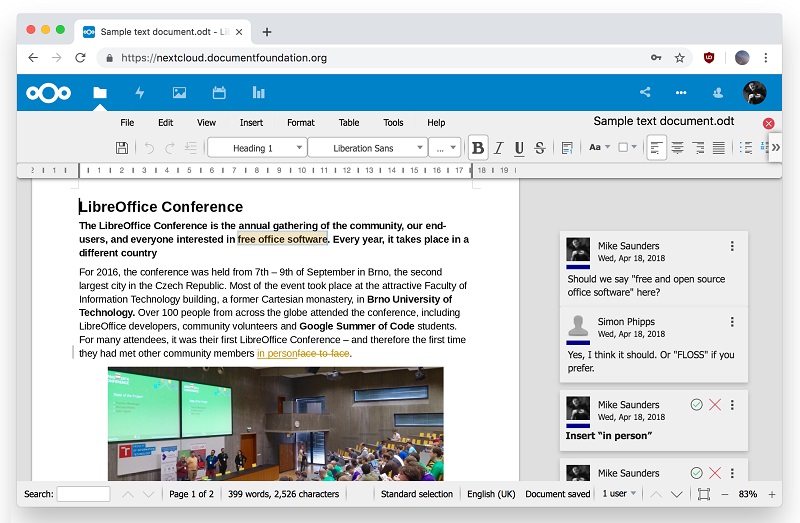
LibreOffice Online is a cloud version of the LibreOffice suite designed for free online document editing in a web browser. It uses the same underlying engine as the desktop application.
LibreOffice Online free

Built from the core code of the LibreOffice project, it allows for the visual display and collaborative editing of documents. This means users can open documents through a browser while keeping the document rendering close to the desktop version of LibreOffice.

Birth of the LibreOffice Online Project

The development of LibreOffice Online is an HTML5 web-based technology produced by SUSE.

In 2015, this proof of concept was rewritten into an initial development release by Collabora, allowing users to test LibreOffice Online for the first time.

In 2016, the first source code version of LibreOffice Online, a cloud-based office suite that offers basic collaborative document editing in a browser by reusing the "core engine" of LibreOffice, was added to the main branch for the announcement of LibreOffice 5.3.

This latest development brought collaborative editing to LibreOffice Online, a feature that transforms the application into an ultra-modern cloud office suite - the first to natively support the ISO/IEC standard ODF (Open Document Format) with collaborative editing capabilities.

The rendering fidelity of LibreOffice Online is equivalent to that of desktop software, and the interoperability matches that of LibreOffice with support for standard and proprietary document formats.

LibreOffice Online has been primarily developed by Collabora, one of the leading contributors to the LibreOffice codebase and community.

In practical terms, LibreOffice Online focuses on making office documents accessible from a browser while keeping key LibreOffice strengths: document formatting, ODF support, compatibility with several document formats, and collaborative editing.